Settings of all online stores created are kept in store container. Each set of settings has unique ID and can be assigned to some URL address. When a customer accesses the URL, respective store ID is passed to store engine. Store engine returns pages according to the set of online store settings. The most important thing is that this configuration interface assumes that provider and resellers are using one and the same online store engine.
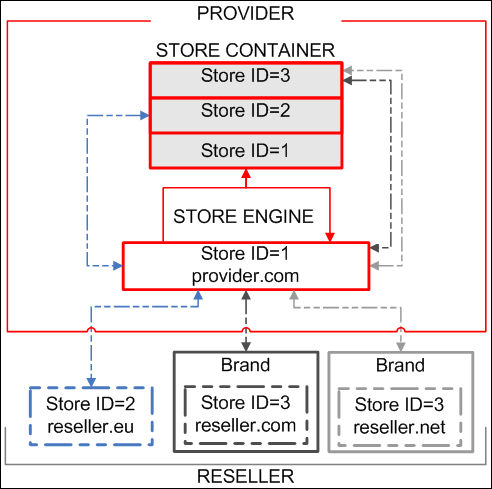
You can associate your domain and store package with the brand during its creation. Reseller's store is accessed by customers through reseller's domain (e.g. reseller.com) or through reseller's sub-domain (for example, shopping.reseller.com), but each such request is processed by an online store engine, common for all resellers hosted elsewhere. In other words, brand serves as a proxy for the online store.
The link to the online store installed with the brand is displayed in the Store URL field of the Connection Setup menu. The link is displayed for online store currently selected for editing. If reseller installed the same store package (Store ID=3) to a number of brands, the link to each of them will be displayed.
Reseller online store can be installed manually without brand creation (Store ID=2). The procedure requires configured online store, registered domain name, hosting and FTP access to hosting from address where Billing is installed.