The main point of taxation configuration is to define:
- Who is charged
- How much they are charged (tax rate)
- For which product or service they are charged
For that, providers need to build a set of taxation rules in Billing for all the regions they intend to sell products to.
Billing allows to configure taxation using:
- Internal Billing taxation mechanism.
- External tax engines: BillSoft EZTax or Vertex O Series. Billing can be integrated with an external tax engine by means of the corresponding tax plugin.
The following taxation objects are used in Billing:
- Taxation rules are central objects of taxation functionality in Billing. They specify what tax will be used for specific group of customers if they purchase products from given category.
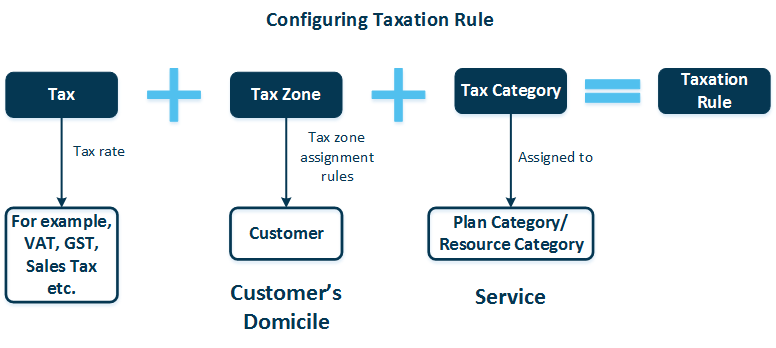
- Tax is a specific tax with a certain rate to be charged (for example, VAT 20%). Taxes are subdivided into those levied on particular services and those levied depending on customer's domicile (federal, state, local and other taxes).
- Tax zone groups all customer's federal, state, and other taxes; it is assigned to customers automatically upon purchasing a service plan.
- Tax zone assignment rules designate the appropriate tax zone to a customer according to the provider's location and the customer's location relative to the provider's location.
- Tax category groups all taxes of a particular service. To make some service plan (resource) subjected to the tax(es) of a tax category you assign this tax category to the respective plan category (resource category).
Billing comes with an already pre-configured set of tax zones, tax categories and tax zone assignment rules. When configuring taxation, you basically only need to operate with taxation rules. Adjusting other taxation objects is not required in most cases.
To configure a taxation rule in Billing, do the following (refer to the scheme below):
- Specify a tax.
- Specify a tax zone.
- Specify a tax category.
For more detailed information, please refer to the Billing Provider's Guide.