Updating PAYG Resources Before the Upgrade to PLM 4.0
This topic describes the procedure for auditing and updating Pay-As-You-Go (PAYG) resource configurations in preparation for upgrade to Product Lifecycle Management (PLM) version 4.0.
Why resource update is required?
PLM 4.0 introduces a significant update to how PAYG resource limits are handled. In previous versions, all PAYG subscription limits were incorrectly translated to "unlimited" (-1) when sent to the Connect platform, regardless of the limit set in the Business Support System (BSS).
PLM 4.0 introduces strict validation and filtering based on the resource configuration:
- Limit 0: The resource is filtered out and is not sent to Connect.
- Limit N > 0: Results in an APSError, causing provisioning and order failures, as Connect does not support positive limits for usage-based resources.
- Limit -1: The correct limit for a PAYG resource. It is sent to Connect as an unlimited resource.
-
Resources with consumption type Usage must have Measurable flag set to True. Otherwise, they will be considered reservation-based resources.
To prevent service disruptions, all PAYG resources must be audited and updated to the correct limits before upgrading to version 4.0.
Migration Procedure
The migration process consists of identifying affected resources, analyzing the audit findings, applying remediation via PPR import, and verifying the final state.
Identify affected resources
Run the diagnostic script payg-audit.py with the on the OSS pod to identify service plans and subscriptions that require update.
- Copy the script to the OSS pod. An example command:
kubectl cp scripts/payg-diagnostics/payg-audit.py oss-node-0:/tmp/payg-audit.py - Execute the audit across all plans. An example command:
kubectl exec oss-node-0 -- python /tmp/payg-audit.py --active-subscriptions
The script will verify that:
-
Measurable flag is correctly set for BSS resources with the usage consumption type.
-
Measurable flag and max amount value are correctly set for resource rates in plans for resources with the usage consumption type.
-
Measurable flag is correctly set for resources in BSS subscriptions.
-
That subscriptions limits are properly configured in OSS.
-
The amount and Measurable flag are correctly set for resources used for dynamic usage collection.
Analyze the audit report
Review the report generated at /tmp/YYYY-MM-DD-payg-resources-report.txt. Pay attention to the following statuses:
Issues related to the Measurable flag. For this group of errors, run the script that mass-updates the affected resources and rates.
Possible errors of this type are below:
-
ERROR: measurable must be true on PAYG rate. Resource rate exists but its usage is not measured.
-
ERROR: measurable must be true on PAYG BMResource. The Measurable flag is not set to True for PAYG resources in BSS.
-
ERROR: IsMeasurable must be true on PAYG subscription resource. There are subscriptions with PAYG resources that are not marked as measurable.
Incorrect limits and configuration. To fix those, update resource configuration. Below are the possible errors of this type:
-
ERROR: positive MaxValue on subscription resource. There are subscription resources with a positive limit, which is not allowed and will cause errors. Fix the affected plans and then synchronize the changes to subscriptions.
-
ERROR: positive maxValue. A positive resource limit detected.
-
NEEDS_REVIEW. A zero resource limit detected. This resource will be filtered out when sending requests to Connect. Review if the resource must be made active.
-
MISCONFIGURED. Technical resources (Dynamic PAYG) have incorrect settings.
Non-critical statuses that do not require actions:
-
OK. The resource limit is set to unlimited, which is a correct configuration for a PAYG resource.
-
STALE. Subscription limit does not match the plan limit. This will be automatically corrected with the next change or renewal order.
-
CONSISTENT. The resource limit is set to 0 (disabled) in both plan and subscription. This is a correct configuration, unless the resource must be active.
Update the measurable flag on usage-based resources
To fix errors related to the measurable flag not being set for usage-based resources in subscriptions and plans, you need to run the script as described below.
The script updates the flag for the following affected objects consecutively, where needed:
-
For BSS resources
-
For plan resource rates
-
For subscription resources
-
For respective APS resources
Note: The script only fixes resources with issues, which makes it safe to re-run it multiple times.
To run the script, complete the following steps:
-
Download the measurable-sync.py script file and copy it to the oss pod or any other node with access to CloudBlue Commerce infrastructure, OSS and BSS credentials configured, and the poaupdater Python module installed:
kubectl cp measurable-sync.py oss-node-0:/tmp/measurable-sync.py
-
Perform a dry run that will only output the SQL update commands without applying any changes.
kubectl exec oss-node-0 -- python /tmp/measurable-sync.py --dry-run
-
Run the script applying the changes.
kubectl exec oss-node-0 -- python /tmp/measurable-sync.py
If needed, you can run the script with the
--st-idflag to update a single service template. Below is an example command:kubectl exec oss-node-0 -- python /tmp/measurable-sync.py --st-id 2145
The script does not change resource limits. Issues with limits require business decisions and must be fixed by configuration updates.
Update resource configuration
-
Export product line configuration.
-
Apply the following settings:
Note: Perform all updates using Product Publication Request (PPR) file import to ensure consistency.
For each PAYG resource that must be active, set the following:
-
IncUnits: 0.
-
MinUnits: 0
-
MaxUnits: -1
-
ShowInCP: false
For each dynamic PAYG resource with incorrect configuration, set the following:
-
IncUnits: 0
-
MinUnits: 0
-
MaxUnits: 0
-
ShowInCP: false
-
-
Import the updated PPR file.
-
Synchronize plan changes down to the distribution chain. Enable the Update Resource Limits checkbox during synchronization.
-
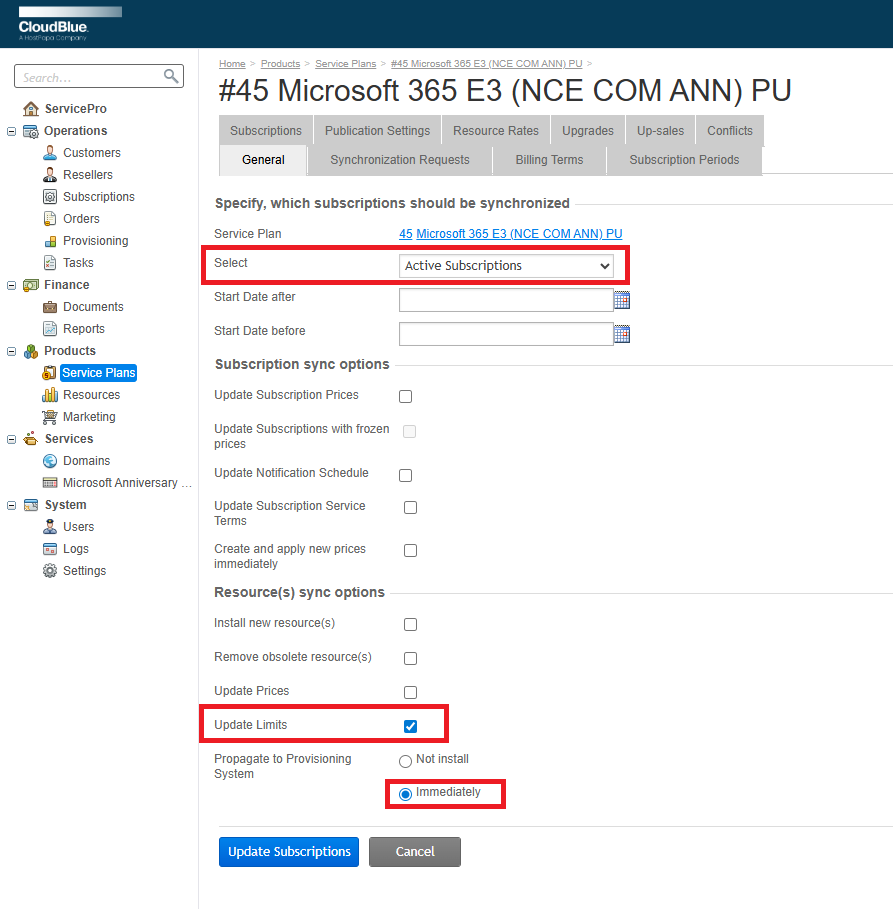
After plan changes are synchronized, it is required to synchronize subscriptions on the affected plans. Do this with the following options:
-
Re-run the
payg-audit.pyscript and confirm that the report shows zero errors.Note: NEEDS_REVIEW errors are only acceptable if the resource was disabled intentionally.