Early Subscription Renewal
The Early Renewal feature allows eligible customers to renew an active Adobe subscription prior to its official Anniversary Date (AD). This enables partners to lock in pricing and extend subscriptions ahead of schedule.
How It Works
-
The Renewal Window: You can place an early renewal order anytime between 30 days and 1 day before the subscription's Anniversary Date.
-
Immediate Billing: Unlike standard renewals that wait until the anniversary date to process, early renewals are processed and invoiced immediately at the price available on the day you place the order.
-
Automatic Remainder Renewal: If a customer partially renews their seats early, the CloudBlue connector will automatically renew any remaining seats on the standard Anniversary Date.
-
Feature Availability: Early Renewal availability can be configured globally, by distributor, or by marketplace. If early renewal is disabled for your marketplace or distributor, the portal will display a message informing that early renewal is not enabled for a specific marketplace/distributor.
-
Auto-renewal: Auto-renewal must be enabled before placing any renewal requests.
-
Persona Restriction: Early renewal functionality is exclusively available to the customer's direct reseller. It cannot be used by providers or operating units.
Order Placement Steps
-
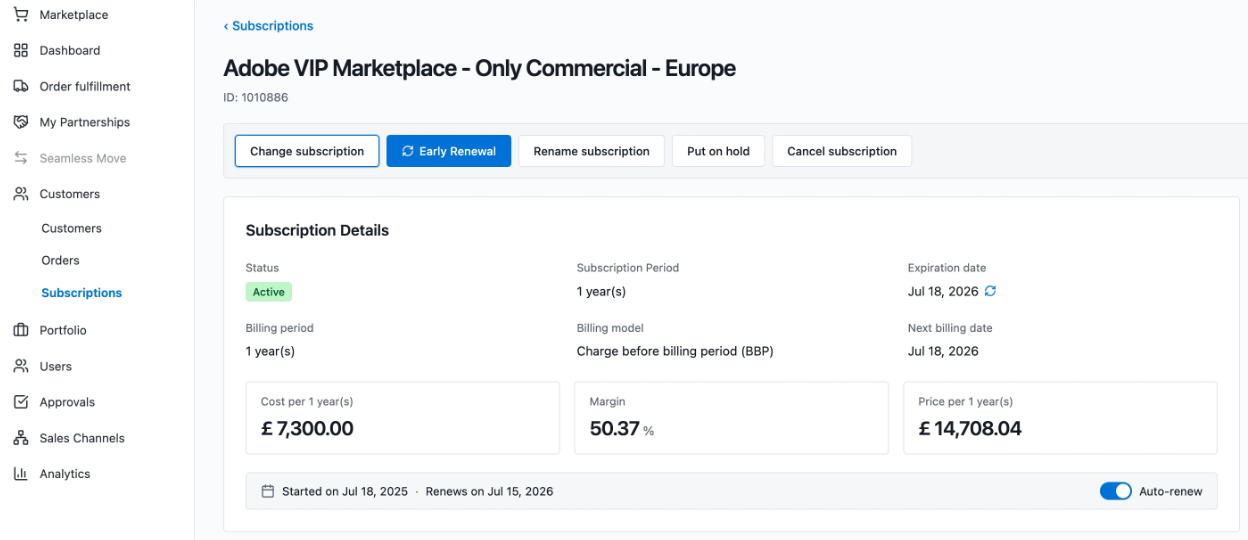
On the Subscription Details screen for an eligible Adobe subscription, click the Early Renewal button.
Note: Because this feature is restricted, providers and operating units will see a disabled button with the following tooltip: Early renewals are only available to the customer's direct reseller.
-
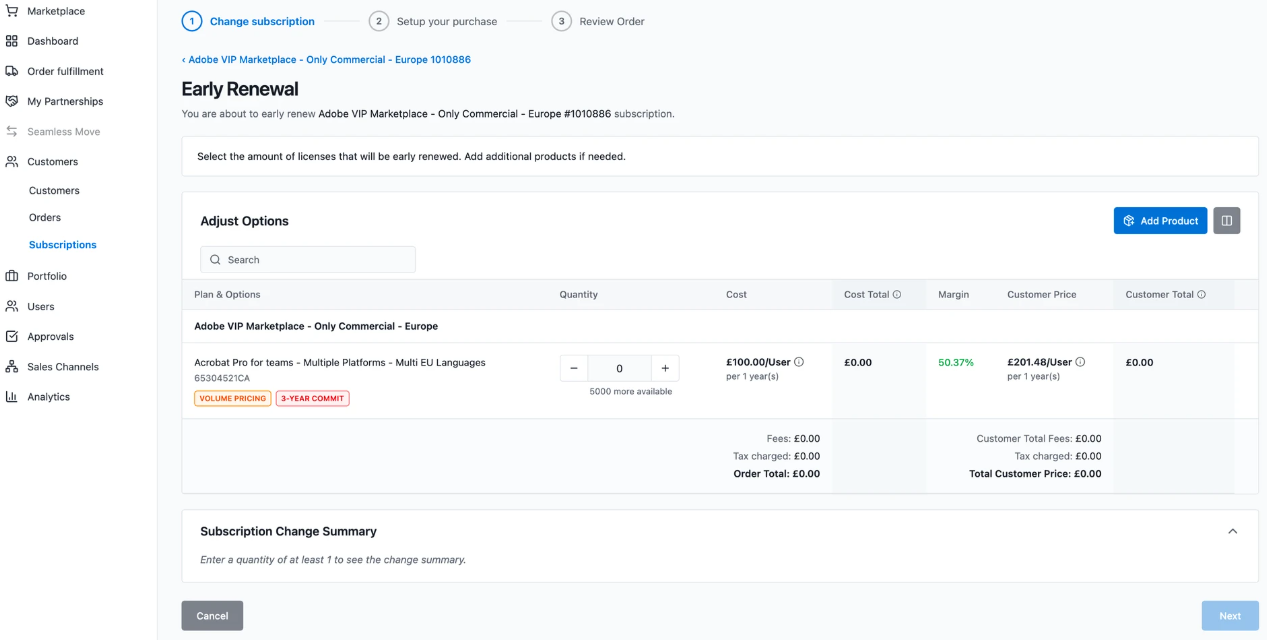
Use the quantity field to enter the additional seat quantities to early-renew for each existing product.
-
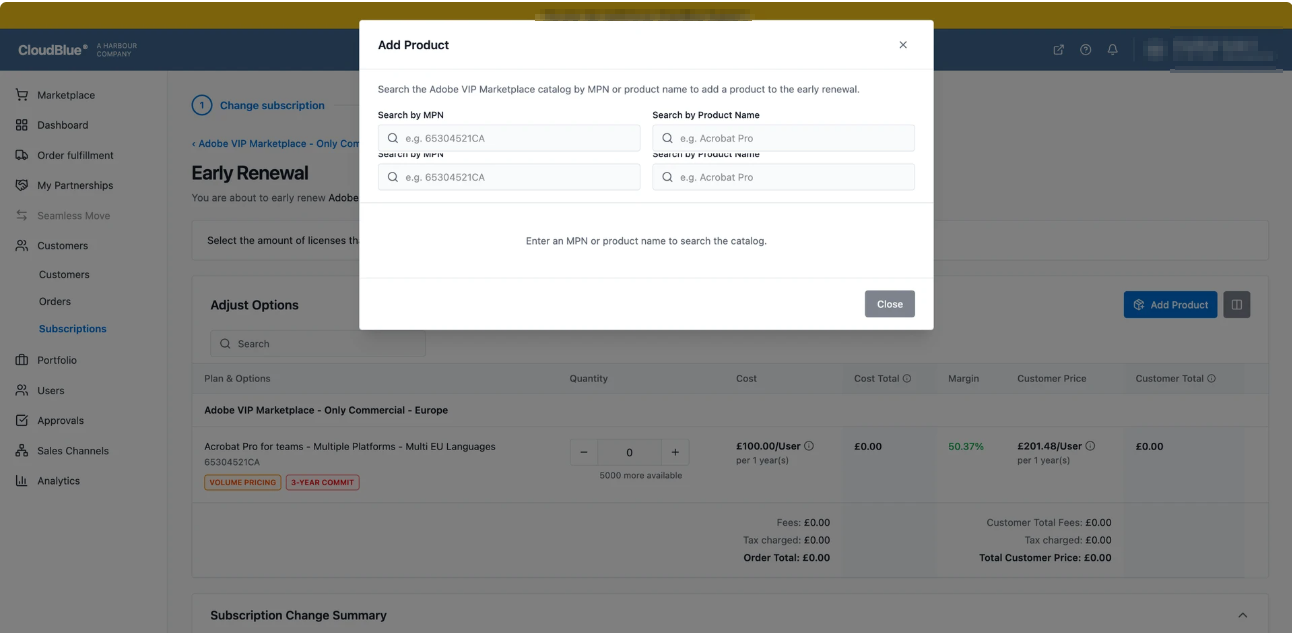
Click the Add Product button to search the Adobe VIP Marketplace catalog by MPN or Product Name. This allows you to add new products/offers to the subscription as part of the early renewal request.
-
Review the order totals and summary before submitting the order.
Business Rules and Constraints
-
The Single-Order Quantity Ceiling: Adobe does not allow a single early renewal order to exceed your current seat count. If you want to renew your existing seats and add extra seats, you must split this into two separate orders. For example, if a customer wants to renew their existing 20 seats and buy 5 extra seats, it must be split as follows:
-
Order 1: Renew the initial 20 seats.
-
Order 2: Place a subsequent order for the 5 extra seats once the first order is completed.
-
-
Three-Year Commit (3YC) Exclusion: Early renewal is strictly blocked for customers who are currently in the final year of a 3-Year Commitment term.
-
Order Returns (Reverts): If an early renewal order was placed by mistake, you can submit a return request within a standard 14-day window. Reverting an early renewal adjusts next-period quantities without altering current-period baseline quantities unless the original order was a combined upsize.
-
Combining Early Renewal with Mid-Term Upsizes: Adobe prohibits standard mid-term seat increases (upsizes) on a subscription once an early renewal has been placed.
-
To add seats during the current period after placing an early renewal, partners must place a combined early renewal order where the coverage period exceeds 1 year.
-
This combined order simultaneously increases seat capacity for the remainder of the current term and early-renews those seats for the upcoming term.
-
Prohibited Lifecycle Operations During Pending Early Renewal: Once an early renewal order is placed and pending before the Anniversary Date, the following actions are blocked until the Anniversary Date is reached:
-
Subscription Cancellation (Allowed only after all early renewal orders have been fully reverted).
-
Plan Switches (including 3-Year Commit plan switches).
-
Account or Subscription Transfers.
-
Scheduled Change Orders targeting the next term.
-
Disabling Auto-Renew (Auto-renew must be enabled to place an early renewal order).
Note: Standard mid-term upsizes or extra early renewal orders remain permitted where supported.
-
System Behavior and Tracking Parameters
-
Order Type Translation: Early renewal requests are processed through the portal as change orders marked specifically for early subscription renewal.
-
Anniversary Date Rollover: Upon successful completion of the first early renewal order, the subscription's Adobe Anniversary Date automatically shifts forward to the next period.
-
Quantity Pinning: Early-renewed quantities are pinned. Subsequent changes during the current term will not override or erase previously completed early renewals.
-
Standard Renewal Adjustments: At the actual calendar anniversary date, the connector evaluates what was already processed. Any remaining seat quantities not covered by early renewals are automatically processed via standard auto-renewal.
| Parameter ID | Phase | Description |
|---|---|---|
| cb_early_renewal_quantities_draft | Ordering | Stores requested early-renewal seats and proration days. |
| cb_early_renewal_quantities_final | Fulfillment | Confirms final approved early-renewed seats, Adobe order ID, and actual prorated days returned by Adobe. |
| cb_revert_quantities_draft | Ordering | Stores requested seat quantities to be reversed during a return order. |
| cb_revert_quantities_final | Fulfillment | Confirms the final list of seats successfully returned and reversed in the Adobe system. |
Early Renewal Error Reference Codes
If an early renewal fails, check the event logs for these status codes returned by Adobe:
| Code | Reason | Description |
|---|---|---|
| 2161/2164 | Subscription Already Renewed | All seats on the subscription have already been fully renewed for the upcoming term. |
| 3115 | Invalid IDs | The Adobe Customer ID or Subscription ID is malformed or cannot be found. |
| 3121 | Boundary Ceiling Crossed | The order attempted to combine a standard limit with additional seats in a single request. Split into two separate orders. |
| 3131 | Early Renewal in Progress | An early renewal transaction is currently open and processing for this subscription. |
| 3132 | Lifecycle Exclusion (EoS/EoL) | The product cannot be renewed early due to End-of-Sale or End-of-Life restrictions. |
| 3133 | Final 3YC Term Active | The customer cannot utilize early renewal because they are in their final 3-Year Commit year. |