Refunds Audit: Finding Discounts Associated with a Refund
The Discount Advisor helps you verify whether the refunds received from AWS align with the discounts applied to customers and resellers. It displays the AWS refund amounts alongside the IDs of the discount rules that the system will use during billing. This allows you to identify discrepancies and adjust discount rules if necessary to ensure consistency with AWS refunds.
How to use the Discount Advisor
To view which discounts will be applied for each refund line during the billing run:
-
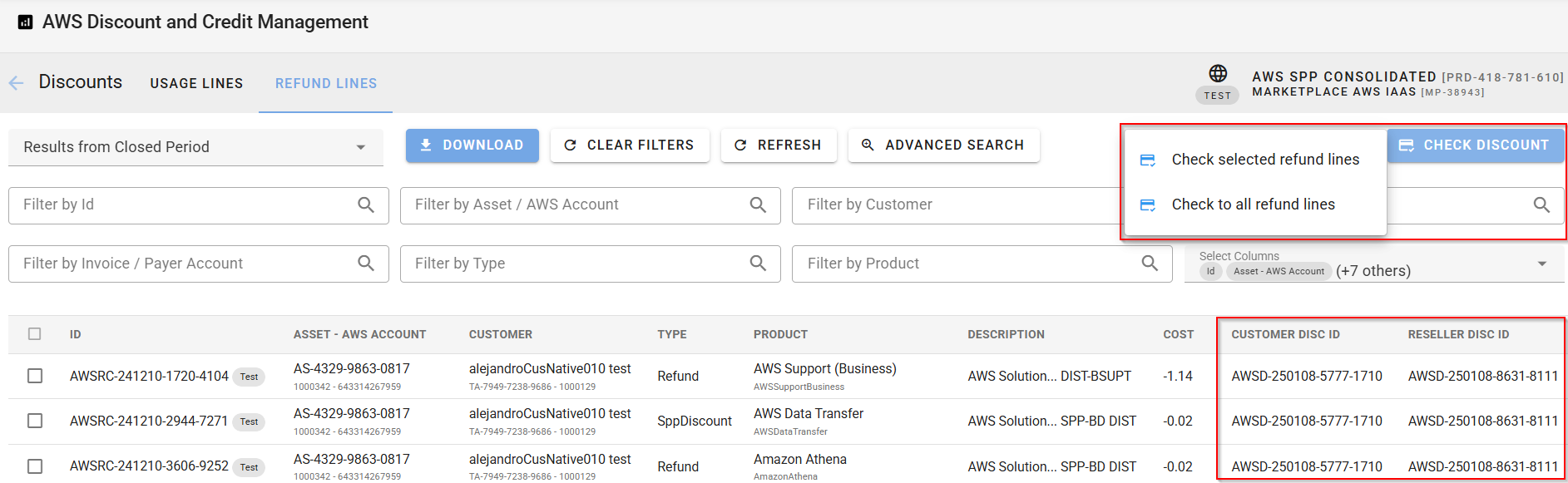
Navigate to the Refund Viewer (Discounts > View Discount Advisor > Refund Lines).
-
Click Check Discount and choose whether to analyze:
-
All refund lines, or
-
Only the selected ones.
Note: Depending on the number of lines, this process may take some time. Click Refresh to update the results in the grid.
-
-
Review Discount Rule Matching: The system matches discount rules based on the AWS ID and service, from most to least granular. The matched rules are shown in the Customer Discount ID and Reseller Discount ID columns. This allows you to see the discounts that will be applied by the discount rule and compare them with the refunds received from AWS for each of the usage lines.
-
Compare with Usage Lines: Switch to the Usage Lines tab and ensure the following columns are visible for a comprehensive comparison:
-
Customer Discount ID
-
Customer Discount
-
Customer Cost
-
Customer Difference
-
Reseller Discount ID
-
Reseller Discount
-
Reseller Cost
-
Reseller Difference
-
Refund ID
-
Refund Amount
For example, if AWS provides a refund of 0.3 and the Customer Difference is 0.24, the customer discount is aligned with the refund, as you are not giving the customer a higher discount than the refund received from AWS. However, if the Reseller Difference is 0.4, this indicates a potential mismatch, and you may need to review the reseller discount rule.

-