Adobe Large Government Agencies (LGA) Program Overview
The Large Government Agencies (LGA) program is a specialized sub-program within the Adobe Value Incentive Plan Marketplace (VIP MP). It is designed to meet the high-volume licensing needs of government entities in the United States and Canada, combining enterprise-level features and support with the flexible subscription management of the standard VIP program.
Current Connector Support (v11.3.0)
-
The Adobe connector v11.3.0 supports the following scenarios:
-
Seamless Move: Migration of existing LGA customers from the standard VIP program to VIP Marketplace via Seamless Move.
-
Enrollment: Creating new LGA customers and enrolling existing customers into the LGA program.
-
Linked Memberships: Enrolling LGA customers in a Linked membership.
-
Eligibility and Timing
-
Target Market Segments: Available to U.S. and Canadian government entities within the GOV segment (Federal or State sub-segments only).
-
Minimum Purchase: An initial purchase of 100 or more licenses is required.
-
3YC Exclusivity: LGA members are not eligible for the VIP Marketplace Three-Year Commit (3YC) amendment. These programs are mutually exclusive.
-
Effective Date: All LGA discounts take effect on the customer's Anniversary Date.
Discount Tiers
Discount levels are based on the total number of licenses purchased, offering significant savings for high volume.
| Discount Levels | Number of licenses |
|---|---|
|
Level 06 |
100 - 999 |
|
Level 07 |
1000 - 4999 |
|
Level 08 |
5000 - 9999 |
|
Level 09 |
9999+ |
GOV to LGA Transition Requirements
To convert an existing GOV customer to LGA, the following conditions must be met:
-
Window for Conversion: Conversion of existing GOV customers must be performed within the last 30 days of the customer's current term (Anniversary Date –30).
-
Offer Restrictions: The connector will reject LGA enrollment if the customer currently holds Team licenses or Consumables.
-
Order Restrictions: Customers in their 30-day conversion window cannot place new orders for Team offers or Consumables.
-
Linked Memberships: The customer must not be part of any active Linked Memberships at the time of conversion. If required, the customer may join an LGA-specific Linked Membership after the Anniversary Date.
-
Renewal quantity: It must consist of a minimum of 100 licenses.
New LGA Customer Requirements
-
Market Segment: The market segment of new LGA customers must be Government.
-
Market Subsegment: Federal or State.
-
Country requirements: The LGA customer added to the Linked Membership must be from the same country as the Linked Membership.
Key Program Notes
-
Supported Products: The LGA program provides Adobe's enterprise products specifically to Government Entities.
-
Distributor Authorization: Only distributors explicitly enabled as LGA distributors for government customers are permitted to create and manage LGA customer accounts.
-
Effective Date: All Large Government Agency discounts take effect on the Anniversary Date.
-
Tracking: LGA enrollment status is tracked via the
lga_statusfulfillment parameter in Connect. Pricing can be tracked using thecb_price_level_hint_final_objectparameter once provisioned.
Feature Activation and Configuration
Distributors can manage the Flexible Discounts functionality using specific configuration parameters within CloudBlue Connect.
| Parameter ID | Parameter Name | Scope / Phase | Description |
|---|---|---|---|
| enable_lga | Enable enrollment in Adobe LGA | Marketplace/Configuration | If set to YES, enrollment to Adobe LGA will be activated for the corresponding marketplace. The default value is NO. |
| item_license_type | Item license type | Item | Use this parameter to identify if items in Connect are Team or Enterprise licenses. This should be configured for all items, but is particularly required for Team license items, as they are not allowed for LGA. |
Order Placement Steps
-
To activate the LGA feature in your marketplace, navigate to the relevant Adobe product within the Connect Distributor Portal and set the
enable_lgaparameter to YES. -
Verify the eligibility:
-
The customer must be a U.S or Canadian government entity (supported only in the GOV segment and the Federal or State sub-segments).
-
Initial purchase of 100 or more licenses.
-
-
Create a purchase order or change order.
-
When prompted, specify if the customer is a Large Government Agency in the Enroll in Adobe LGA field.
-
If the customer was marked as an LGA in the previous step:
-
To join an existing Linked Membership, enter the Linked Membership ID.
-
To create a new membership, enter a Linked Membership Name.
-
Viewing LGA Linked Memberships in the Adobe Reseller Console
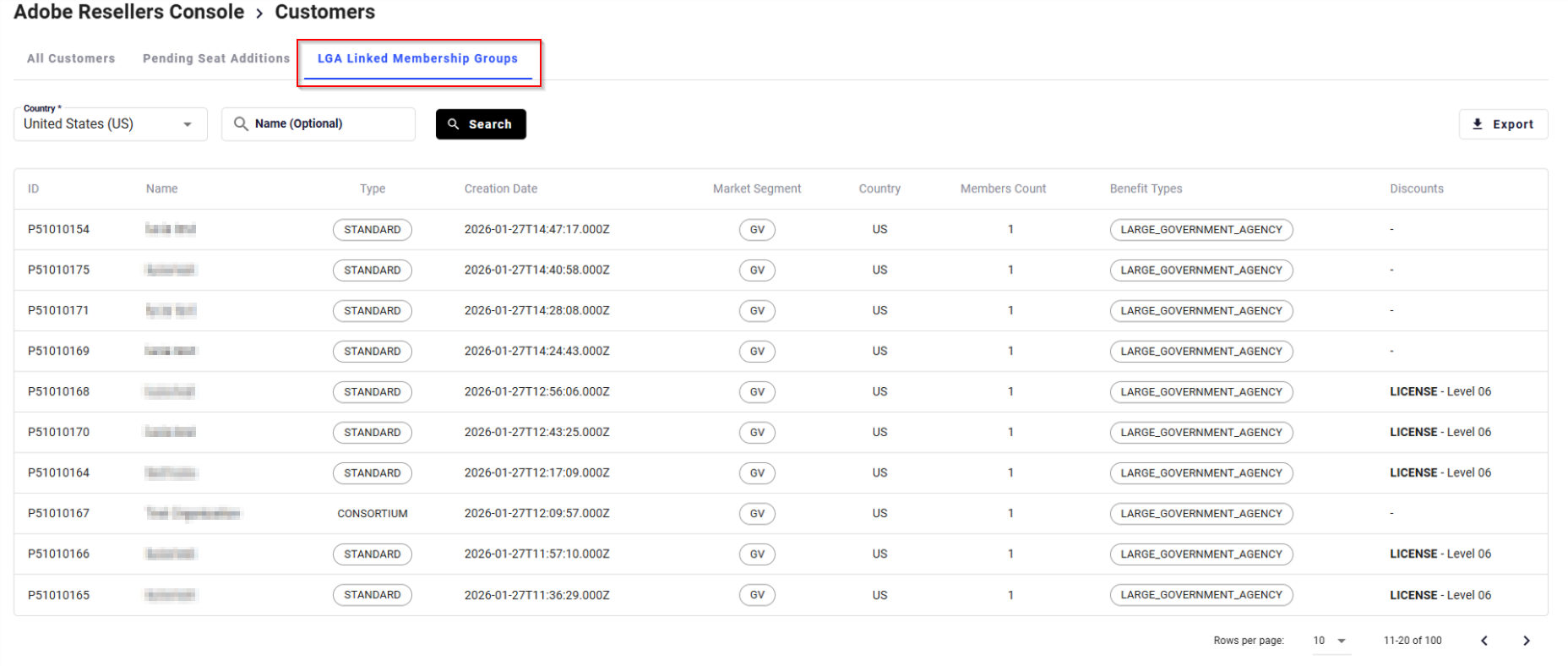
In the Adobe Resellers Console (My Partnerships > Manage > Adobe Customer Management) you can see the LGA Linked Membership Groups in the corresponding tab.
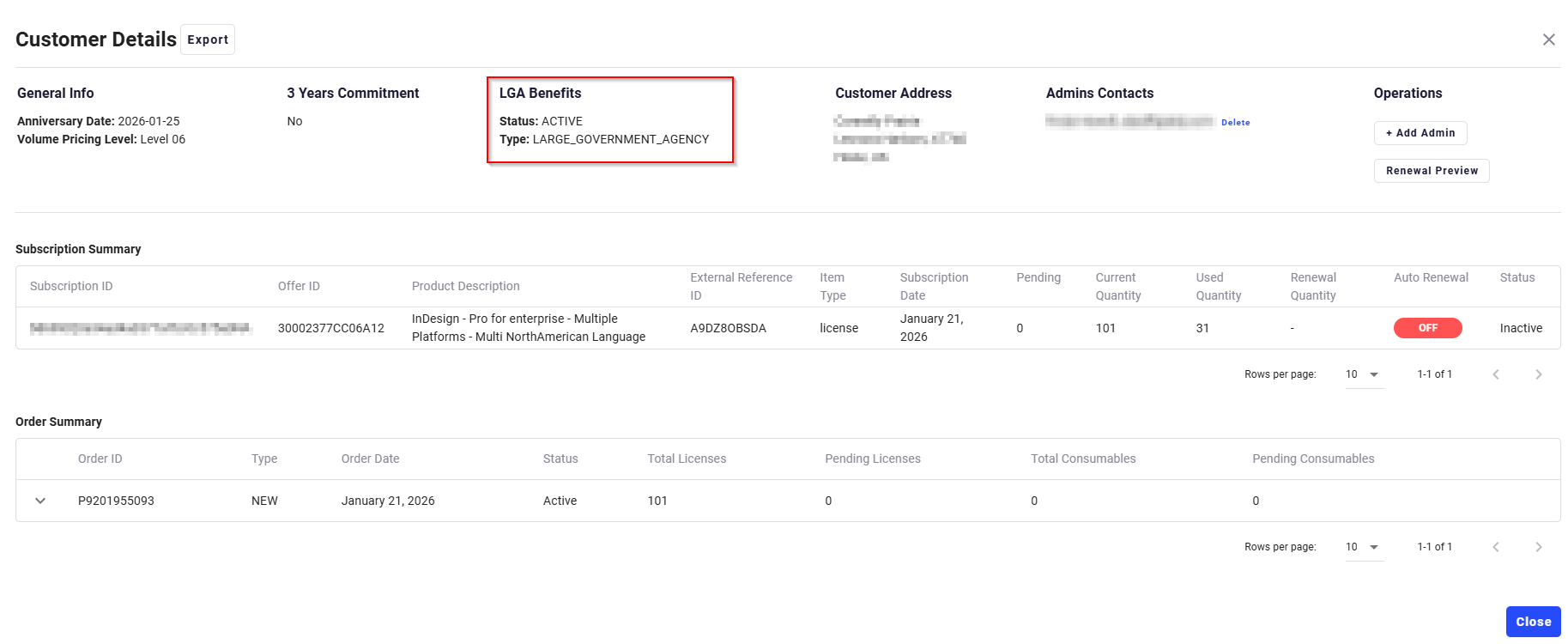
Additionally, in the customer's details you can see the LGA status.
Tracking Parameters in CloudBlue Connect
| Parameter ID | Parameter Name | Phase | Description | Allowed Values / Notes |
|---|---|---|---|---|
| is_lga_customer | Enroll in Adobe LGA | Ordering |
Specifies if the customer will be enrolled in Adobe LGA program. |
|
| cb_marketplace_subsegment | Marketplace Subsegment | Ordering |
Required if |
|
| lga_linked_membership_action | LGA Linked Membership Action | Ordering |
It indicates if the customer will be enrolling in an existing Linked Membership or if a new Linked Membership needs to be created for the customer. |
Note: If not_enroll is selected, the next two fields should be ignored. |
| lga_linked_membership | LGA Linked Membership | Ordering | Used to specify the ID of an existing LGA Linked Membership or the name of the Linked Membership when a new one is created. | Can be left blank if the customer is not enrolling in a Linked Membership. |
| lga_linked_memberships | LGA Linked Memberships | Ordering | Returns a list of available Linked Memberships in a JSON object. | |
| lga_status | LGA status | Fulfillment | Contains the LGA enrollment status. |