Multi-Currency updates CloudBlue Commerce behavior in several aspects, specifically:
Updated User Experience
Several screens in UX1 Marketplace change to allow viewing and adjusting prices in the sales currency. The screens are changed differently depending on the user role.
Changes for Providers and Reseller
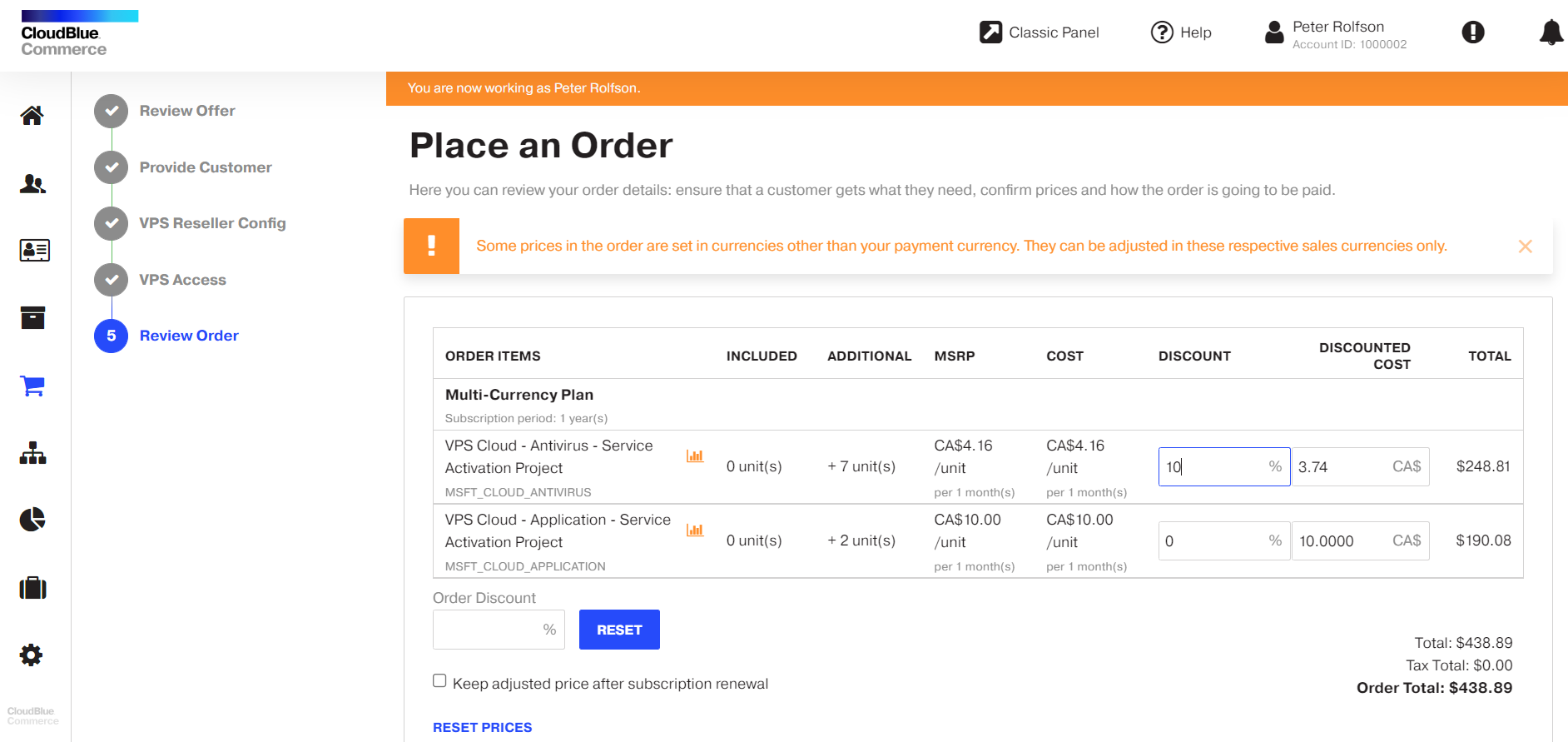
If as a provider or reseller, you use the Adjust Prices functionality, at the last step of checkout wizard you will see a notification that prices can be adjusted in the original sales currency only. Here you can also hover over the chart icon to preview prices in both currencies and see the exchange rate that was used for prices calculation.
Changes for Resellers
Resellers can now see prices in sales currency when they manage a subscription. For more information, refer to The Reseller's Guide to CloudBlue Commerce with UX1 Marketplace.
Changes for Customers
Customers can now see prices in sales currency when they buy a subscription. For more information, refer to The Customer's Guide to CloudBlue Commerce with UX1 Marketplace.
Updated System Behavior
Multi-Currency also changes how the system behaves in some aspects. See more details below.
Price Conversion on Order Placement
After you configure a sales currency for a service plan, you start managing its prices that sales currency.
Important: When a subscription to that plan is created, it inherits the plan currency.
When an order for a subscription to that plan is placed, conversion to customer payment currency is made:
-
The system requests actual exchange rate for the sales and customer payment currency.
-
The system stores the information related to conversion, including the exchange rate that was applied, the exchange date, sales currency code, and converted price.
-
Order and invoice details include this information, which is also becomes available for extraction using Reporting and Data Export.
Note: If you want this information to be included to invoices in the PDF format, you need to update the template as described in the Enabling Extra Invoice Details in Notifications to Resellers section.
The information about the original prices in sales currency is kept in the new fields in invoice and order details, but they remain empty if sales currency is not set for the service plan.
In the Reporting and Data Export (RDE) reports, if the sales currency is not set for the plan, these fields will contain the same values as for customer payment currency.
Refunds
When calculating a refund for a subscription with prices fixed in a sales currency, the refund amount is calculated using the exchange rate applied in the latest order for that subscription, which can be billing, renew, or sale order.
Usage Reports
When loading usage reports for a subscription, CloudBlue Commerce ignores the currency specified in such reports. These reports are treated as if they were in the sales currency. During processing of these reports, conversion to payment currency is performed.
Promotions and Discounts
When configuring promotions in absolute values, mind that it will be applied in sales currency. Make sure that you apply it only to the plans with the same sales currency and only with that currency in which you created the promotion.
Discounts are also applied to the price in sales currency.